


Jeremy's AI assistant
I'm here to show you what Jeremy builds, and what it could save you.
More than 30 years building software. Today he runs AI operations at The AME Group. Ask me anything, or keep scrolling.
30+ years building software. Runs AI operations at The AME Group.
So who is Jeremy, and what does he do?
Jeremy's AI assistant
He finds the work your people do by hand, over and over, and builds software that does it for them.
Jeremy has been building software for more than 30 years. Today he runs AI operations, internal and external, at The AME Group, one of the largest managed service providers headquartered in Indiana. He builds the tools, he builds the AI agents, and he trains the people who use them. He works end to end: first spec, the build, automated tests, signed self-updating releases, and a plain-English guide for the people who use it.
He's glad to hear from businesses that want something built, and from employers with the right role. Either way, start with a text.
It reads what people used to retype.
Handwritten parts sheets, AutoCAD drawings, hundreds of Word SOPs. The tool reads them, checks itself, and only asks a person about the parts it is unsure of.
OCR Watch · CAD Drawing Index · AME-XDOCIt works for you, as an AI agent.
Personal AI assistant agents that triage an inbox, chase follow-ups and turn meetings into notes, plus agents built for one specific task or a whole workflow. The assistant on this page is one of them.
localzero · FollowUp AI · CommCentral · AME Meeting Transcript AgentIt watches what nobody has time to watch.
AI credit budgets, repair spend across branches, security gaps in Microsoft 365.
Hatz User Watch · Fleet Insights · M365AssessIt connects AI to the systems you already run.
Safely, with narrow keys and a log of every call, so an assistant can answer with your real data.
AME MCP Server · Secure AI Hatz Tips
How much has he actually shipped?
Jeremy's AI assistant
38 tools in 8 months. Here's the shape of it.
- 38
- tools built, Mar 2026 to Oct 2026
- 15
- in production use today
- 83
- versioned releases shipped
- 18,400
- automated tests across 22 tools
- 760,000
- lines of code, about
- 25
- of the 38 are built on AI models
- Python17
- C# / .NET10
- TypeScript / React5
- SQL9
- PowerShell4
- Rust1
Counts come straight from each project's code and release history. "Built on AI" means the tool calls a language or vision model as part of its job.
How much has that actually saved?
About 15,500 hours a year, across eight tools.
Estimates · tap any line to see the mathShow me what he's built.
Eight of the tools, in use today.
Each one has its own page: the problem, how it works, and how the savings estimate was made.
Fleet Insights
Monthly repair reports that show each branch which trucks cost too much.
Est. 4,440 hrs / $244,200 a yearSee how it works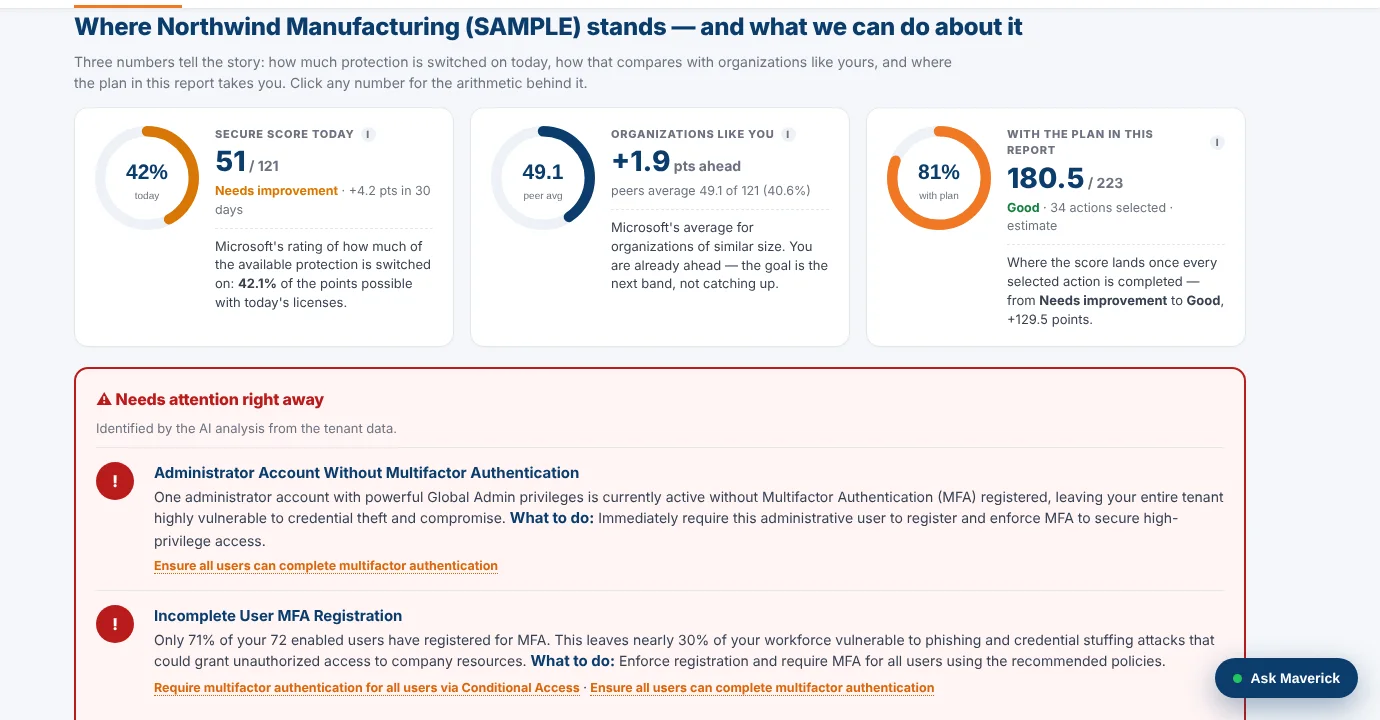
M365Assess
One read-only sign-in turns a Microsoft 365 tenant into a security plan.
Est. 1,800 hrs / $153,000 a yearSee how it works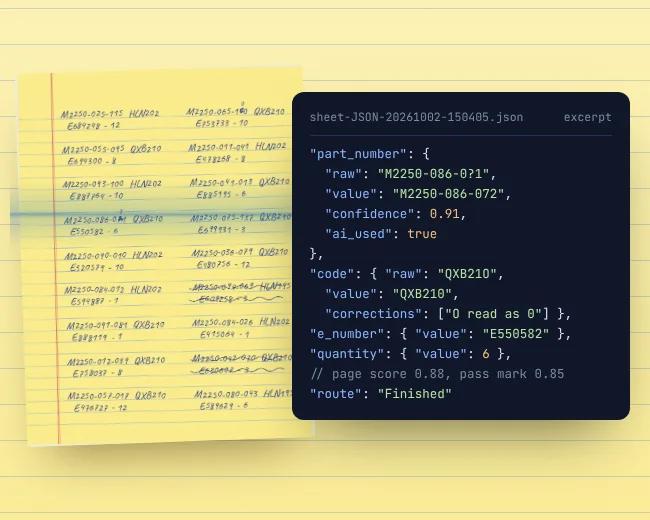
OCR Watch
Reads handwritten parts sheets on the PC and flags only uncertain entries.
Est. 4,583 hrs / $252,083 a yearSee how it works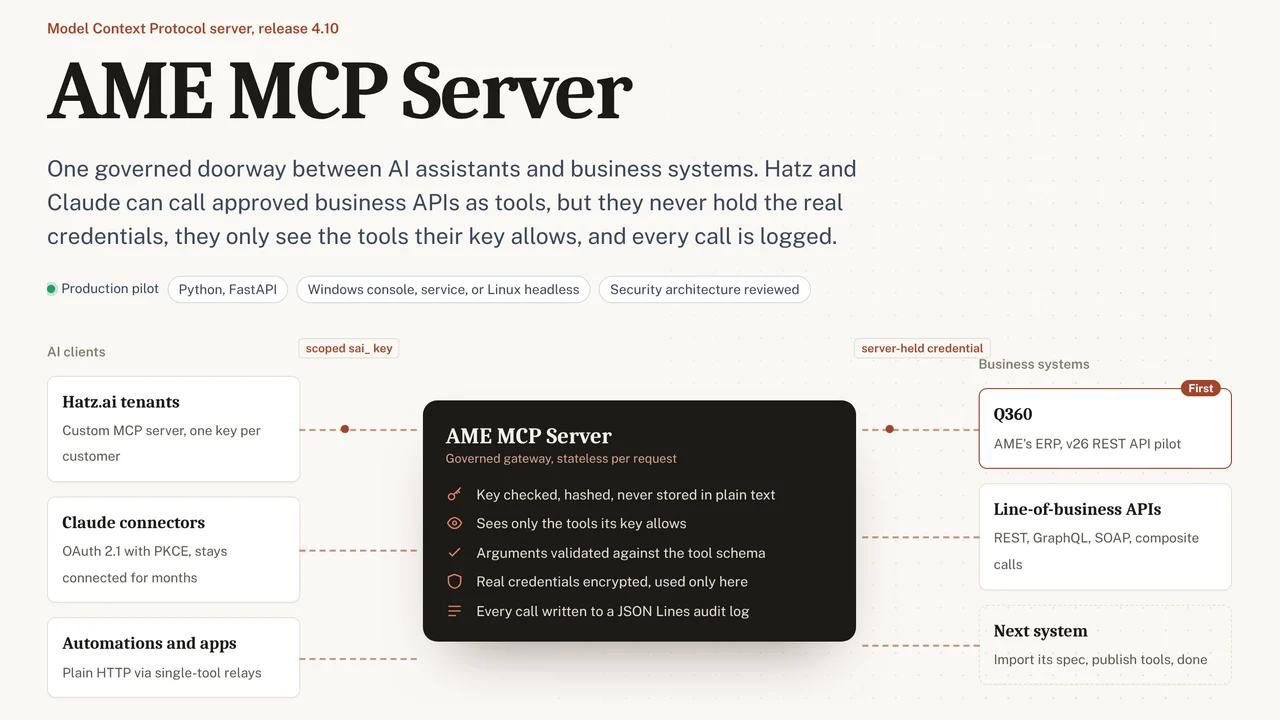
AME MCP Server
One governed doorway between AI assistants and business systems.
Est. 667 hrs / $36,669 a yearSee how it works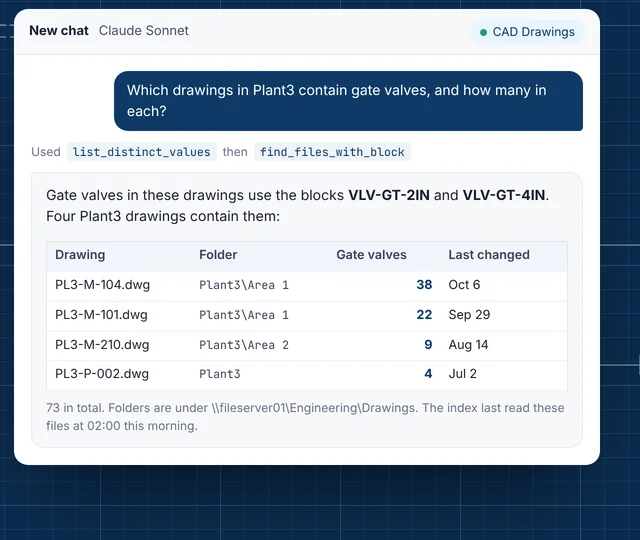
CAD Drawing Index
Lets staff ask their AI assistant what is inside AutoCAD drawings.
Est. 550 hrs / $41,250 a yearSee how it works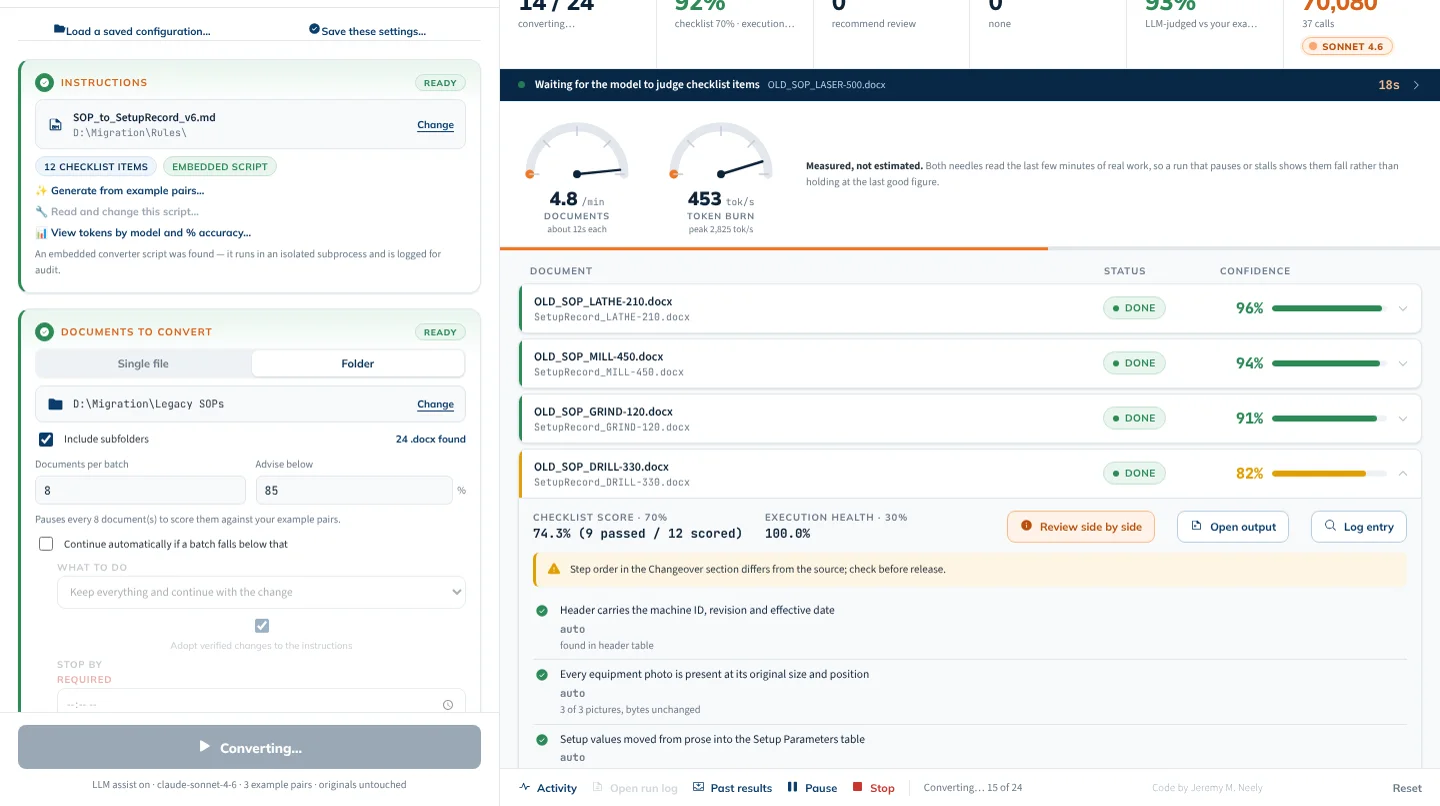
AME-XDOC
Moves hundreds of Word documents to a new template, and checks itself.
Est. 917 hrs / $68,750 a yearSee how it works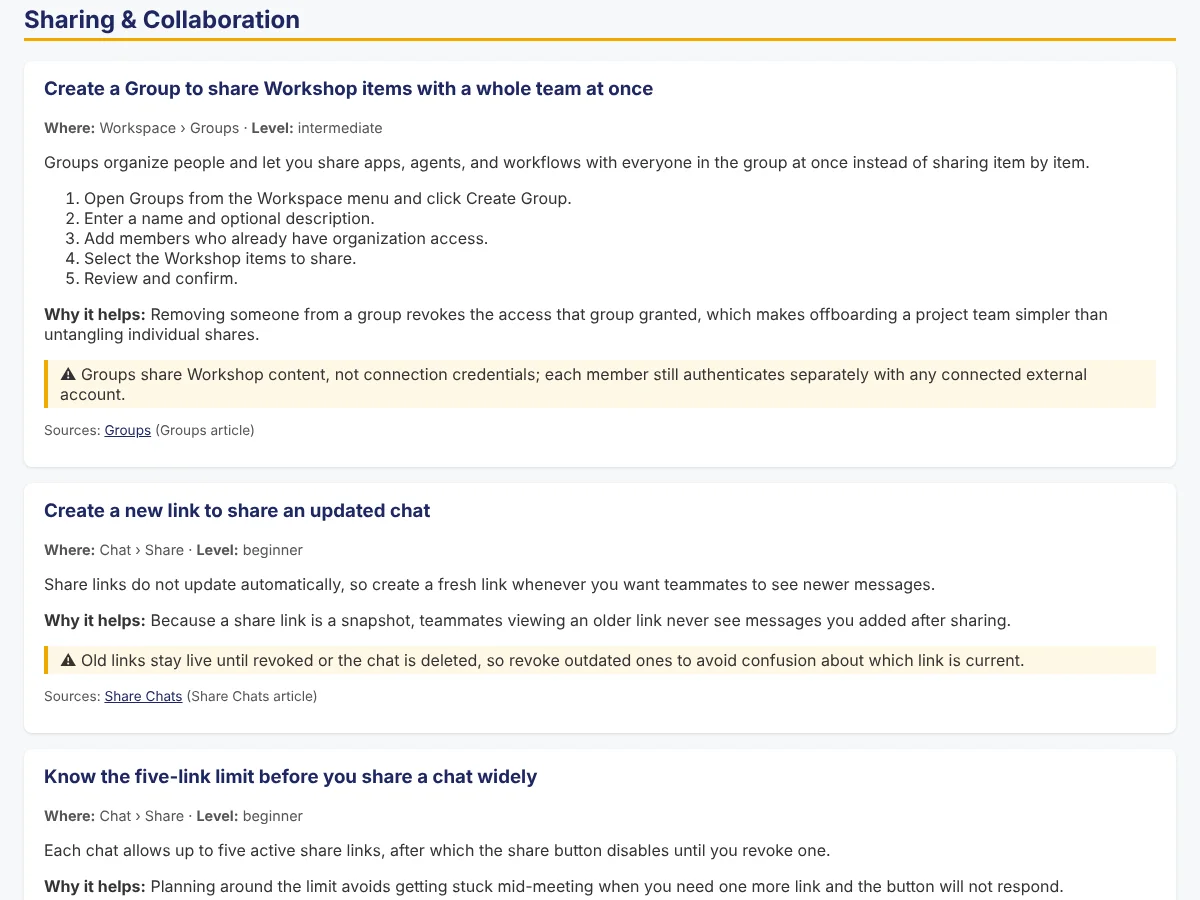
Secure AI Hatz Tips
Fact-checked how-to answers inside the AI chat customers already use.
Est. 720 hrs / $39,600 a yearSee how it works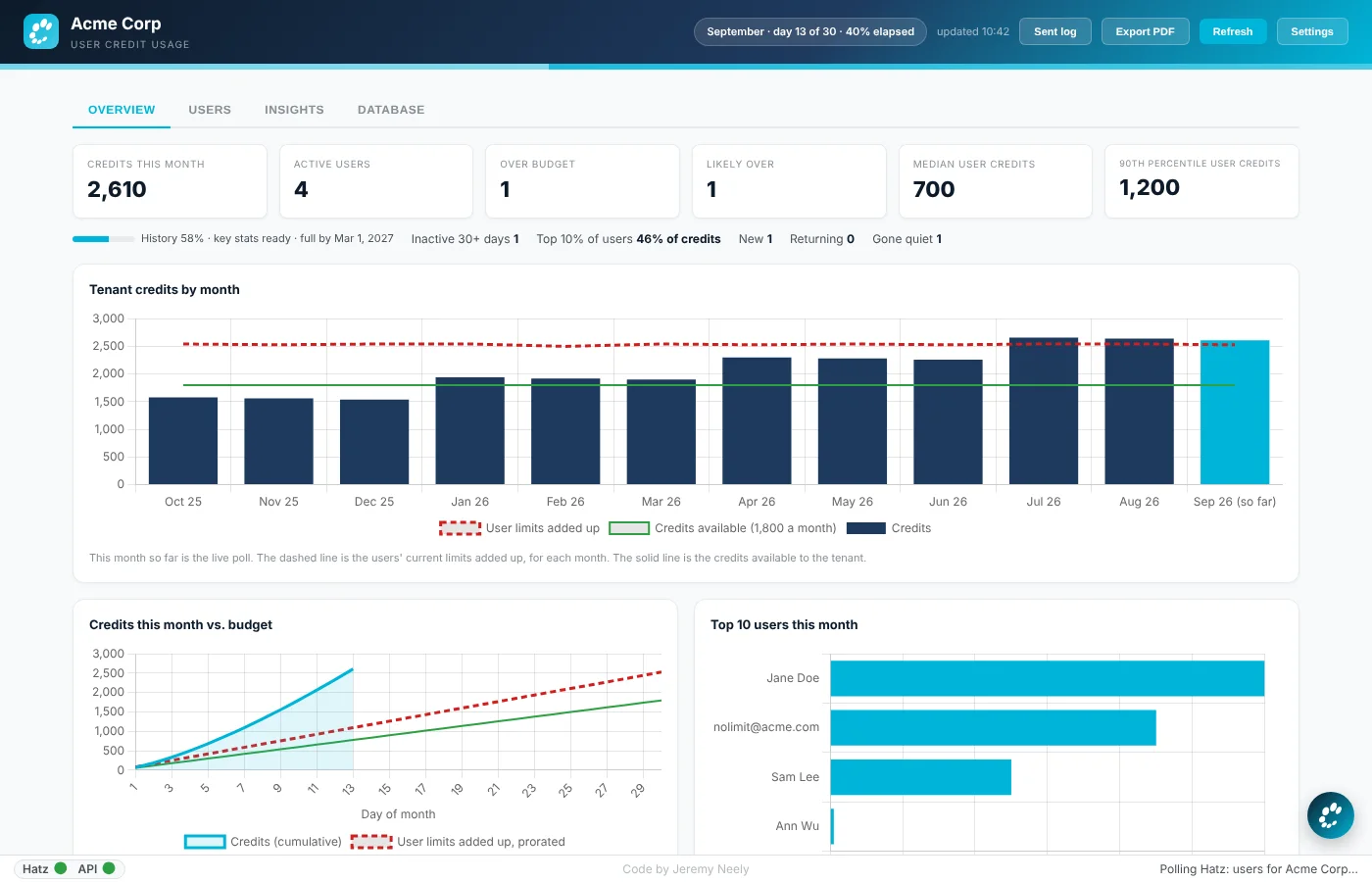
Hatz User Watch
Warns admins before any person runs out of AI credits.
Est. 1,833 hrs / $155,833 a yearSee how it worksPlus 30 more, from personal AI agents to a PC repair kit. Every one has its own page.
See all 38 toolsTools are one thing. How does he get a whole team to actually use AI?
Jeremy's AI assistant
He teaches it. Jeremy designed, and runs, every customer's AI onboarding at The AME Group.
It's a 90-day program built on Crawl, Walk, Run: six two-hour working sessions on the customer's own work, Office Hours in between, and a certification at the end of each phase. By Day 90 the team can find, build, track and scale AI on its own. Jeremy's customers have told him it's the part they appreciate most.
- CrawlWeeks 1 to 4
Small wins, today.
Everyone gets into secure AI chat and sends real prompts in the first session. Then prompt craft, choosing models, and turning on the right tools.
AI Champion · AI Navigator - WalkWeeks 5 to 8
Build on real work.
Map the team's actual processes, ask "Can I AI that?" of every step, rank the ideas, and build the first workflow or agent on the customer's own work.
Secure AI Builder - RunWeeks 9 to 12
AI-first, at scale.
Scale what works into other departments, fix what lags, set governance, and graduate by drafting a new use case on their own, with no help from AME.
Secure AI Implementer
Every session runs the same loop
- Before
- Live
- Earn
- Apply
- Measure
Everything is tracked weekly against a baseline. Program targets: three executive wins, 10+ minutes saved per person per week, and a 10% lift in business outcomes.
Built to run it: SecureAIDB · Secure AI Process Map · Secure AI Hatz Tips · AI Hours Tracker · Hatz User Watch
Where the calculator's numbers come fromOne line per switch: hours saved per affected person per year, who it applies to, and the basis.
| Switch | Hours per person, per year | Applies to | Basis |
|---|---|---|---|
| Business lookups | 3 | 100% of your team (employees) | Jeremy's worksheet for AME MCP Server, shown on its page |
| AI how-to | 1 | 100% of your team (employees) | Jeremy's worksheet for Secure AI Hatz Tips, shown on its page |
| Meeting notes | 121 | 30% of your team (people who write up meetings) | Jeremy's estimate, tool in testing |
| Email follow-ups | 26 | 30% of your team (people who live in email) | Jeremy's estimate, tool in testing |
| Retyping paperwork | 382 | 3% of your team (people who handle paper forms) | Jeremy's worksheet for OCR Watch, shown on its page |
| Documents & SOPs | 229 | 3% of your team (people who maintain documents) | Jeremy's worksheet for AME-XDOC, shown on its page |
| Drawings & files | 55 | 10% of your team (people who search drawings) | Jeremy's worksheet for CAD Drawing Index, shown on its page |
| Branch & fleet costs | 30 | 5% of your team (branch or service managers) | Jeremy's worksheet for Fleet Insights, shown on its page |
| Ticket & time notes | 167 | 10% of your team (technicians) | Jeremy's estimate, tool in testing |
| IT troubleshooting | 120 | 5% of your team (IT staff) | Jeremy's estimate, tool in testing |
| Microsoft 365 reviews | 18 | 2% of your team (people who run reviews) | Jeremy's worksheet for M365Assess, shown on its page |
| AI usage & cost | 183 | 1 AI admin | Jeremy's estimate, tool in testing |
| AI rollout | 167 | 1 person running the rollout | Jeremy's estimate, tool in testing |
| Shadow AI & compliance | none counted | 1 visibility, not hours | visibility, not hours |
The email line assumes 30 minutes a week per person. Hours become dollars at $55 an hour, a loaded cost for an office worker; the featured tools use $75 or $85 where the work is done by engineers or admins.

Ready to talk? Here's exactly how.
No sales team and no newsletter. Every message lands on Jeremy's own phone, and he answers himself, by text. Three things he can do for you: build a tool that does a job your people do by hand, build an AI agent for a task or a whole workflow, or get your team using AI with his Crawl, Walk, Run program.
Text Jeremy now
Tap the button. Your Messages app opens with this note already written. Change anything you like, then send.
·
Have Jeremy text you
Leave a name and a number or email. Your message from the left goes with it, straight to his phone, after a quick human check. Nothing is stored anywhere else.
What happens next. Jeremy reads it himself and replies by text. If something he has already built fits your problem, he'll say so and point you to it. If nothing would pay off for you, he'll tell you that too.